An Overview of the Left-Hand Navigation Menu Follow

What is the Navigation Menu?
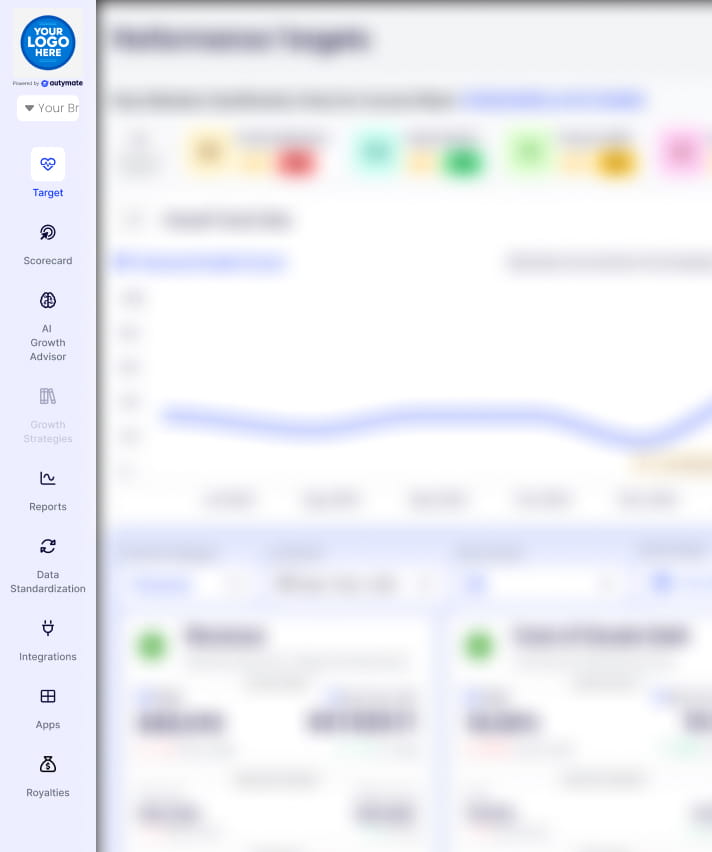
The left-hand navigation menu is the primary way to navigate AI Growth Advisor. It appears on the left side of your screen and contains all the key sections you need.
How to Use It
- Click on a Menu Item – Each section opens with one click.
- Icons Help You Identify Sections – Every menu item has an icon for quick recognition.
- No Extra Steps – Move between sections instantly without returning to the main dashboard.
Understanding the Menu Options
1. My Goals: Set Focus goals and track them to see your progress.
2. Scorecard: View performance metrics and business insights.
3. AI Strategist: Get AI-driven recommendations based on your data.
4. Reports: Access and review detailed reports.
5. Data Standardization: Maintain clean, structured, and accurate data.
6. Integrations: Connect AI Growth Advisor with other tools and services.
7. Apps: Explore and manage additional AI Growth Advisor features.
Why Use the Navigation Menu?
✔ Saves Time – Direct access to important sections.
✔ Easy to Recognize – Icons and labels make it simple to find features.
✔ Keeps You Focused – No distractions, just quick access to what you need.
Tips for Better Navigation
Familiarize Yourself – Click through the menu to understand where everything is.
Use the Icons – They help you find sections faster.
Final Thoughts
The navigation menu serves as your control panel for the AI Growth Advisor. Once you get used to it, moving between sections will be quick and effortless.
Comments
0 comments
Article is closed for comments.