How Can I Create Custom AI Growth Advisor Scorecard? Follow

Steps to Create a Custom AI Growth Advisor Scorecard
Step 1: Log in to AI Growth Advisor
- Open your browser and go to Autymate.com.
- Enter your credentials and log in to your account.
Step 2: Navigate to Custom Scorecards
- Click on the "Scorecard" tab in the left-hand menu.
- Select "Custom Scorecard" at the top of the page.
Step 3: Create a New Scorecard
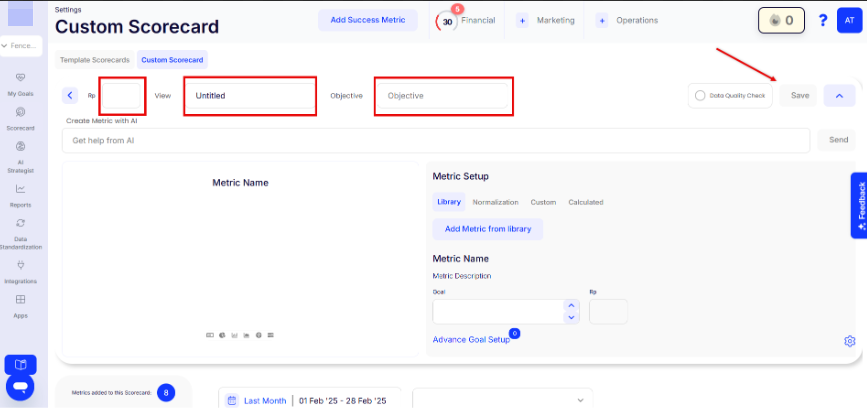
- In the View field, enter a meaningful name for your scorecard.
- Define the Objective of the scorecard (e.g., "Increase Revenue" or "Optimize Expenses").
- Assign a Responsible Party (RP) if applicable.
Step 4: Add Metrics to the Scorecard
- Use AI assistance by clicking "Get help from AI" to generate metric suggestions.
- Click "Add Metric from Library" to choose from pre-defined KPIs.
- You can create custom or calculated metrics by selecting the appropriate tab.
- For each metric, define:
- Metric Name – The title of the KPI.
- Metric Description – A concise explanation of what the metric tracks.
- Goal – The target value you aim to reach.
- RP (Responsible Party) – Assign accountability for the metric.
Step 5: Configure Advanced Settings
- Click "Advanced Goal Setup" to configure additional metric options.
- Use the Data Quality Check option to verify data integrity before saving.
Step 6: Save Your Scorecard
- Click the "Save" button in the top right corner to store your scorecard.
Tips for Effective Scorecards
✔ Be Specific – Clearly define each metric to ensure accurate tracking and reporting.
✔ Keep it Simple – Focus on essential KPIs that drive performance.
✔ Use AI Assistance – Take advantage of the "Get Help from AI" feature for recommendations.
✔ Regular Updates – Ensure real-time data syncing for accurate reporting.
Troubleshooting
🔹 Metrics Not Updating? Check your data source connections.
🔹 Scorecard Not Saving? Ensure that all required fields are completed.
🔹 Display Issues? Refresh the browser or clear your cache.
By following these steps, you can easily create and manage custom scorecards in AI Growth Advisor, helping you stay on top of your most important metrics and business goals.
Comments
0 comments
Article is closed for comments.