How Do We Define Goals on Each Metric? Follow

Setting goals for each metric in AI Growth Advisor helps track performance and measure success effectively. Follow these steps to define goals for your scorecard metrics.
Step 1: Navigate to Scorecards
- Log in to your AI Growth Advisor account.
- On the left-hand navigation bar, click on "Scorecards".
- This will open a list of all the scorecards you have set up for your organization.
Step 2: Choose Your Scorecard
- Select the scorecard where you want to define goals for each metric.
- Click on it to open the Scorecard Editor.
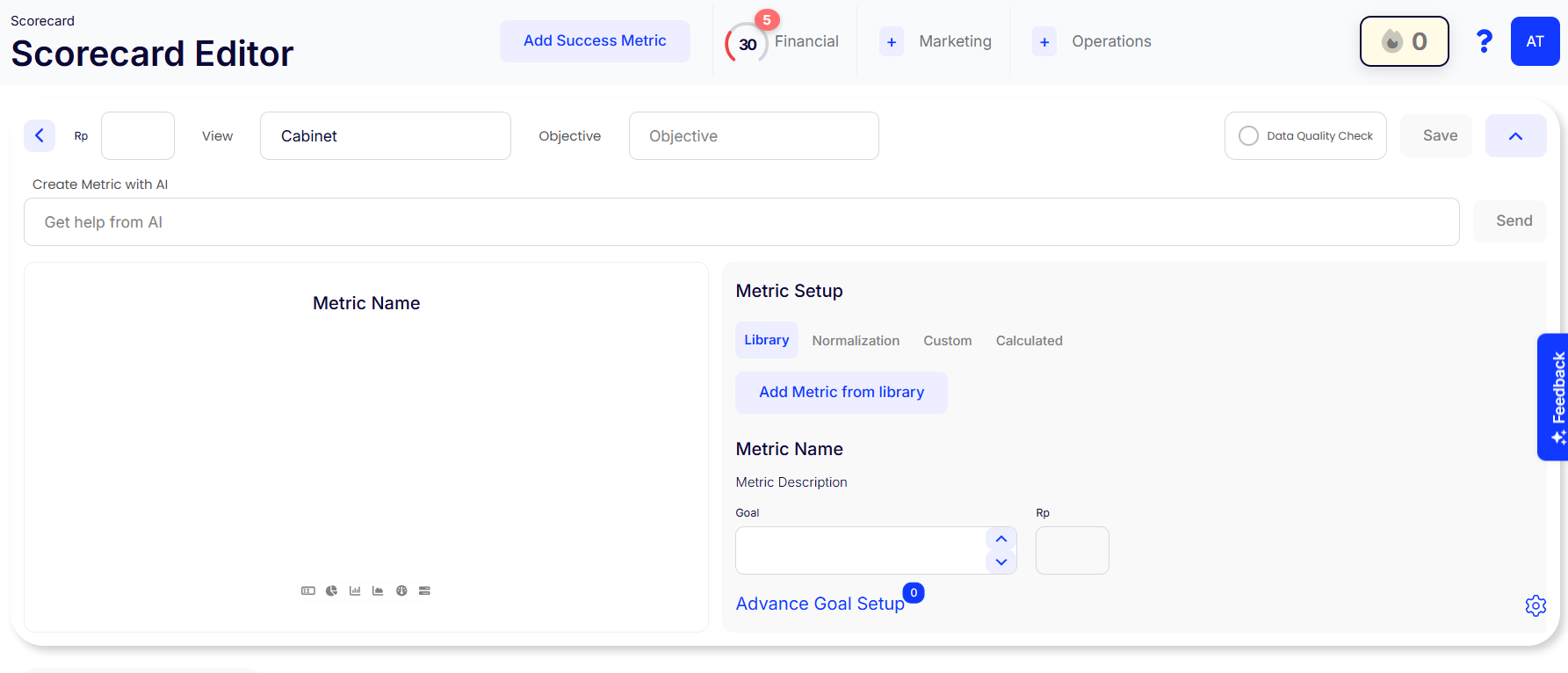
Step 3: Edit Your Scorecard
- In the Scorecard Editor, navigate to the metric setup section.
- Click "Add Metric from Library" or create a new custom metric.
Step 4: Define Your Goal
- Locate the "Goal" field under the metric setup.
- Enter your desired target value for the selected metric.
- Assign a Responsible Party (RP) if applicable.
- Click "Advanced Goal Setup" for additional configuration options.
Step 5: Save and Monitor Progress
- Click the "Save" button in the top-right corner of the screen to apply your goal settings.
- Regularly check the Scorecard Overview to track progress.
Tips for Effective Goal Setting
✔ Be Dynamic – Regularly review and adjust goals to align with business needs.
✔ Stay Motivated – Set challenging yet realistic goals to drive performance.
✔ Use AI Assistance – Click "Get Help from AI" for smart metric recommendations.
Setting goals for each metric in Autymate is a quick and easy process. Keep your goals updated and monitored to ensure your team stays on track and achieves success.
Comments
0 comments
Article is closed for comments.