Generate Your Custom Financial Reports Follow

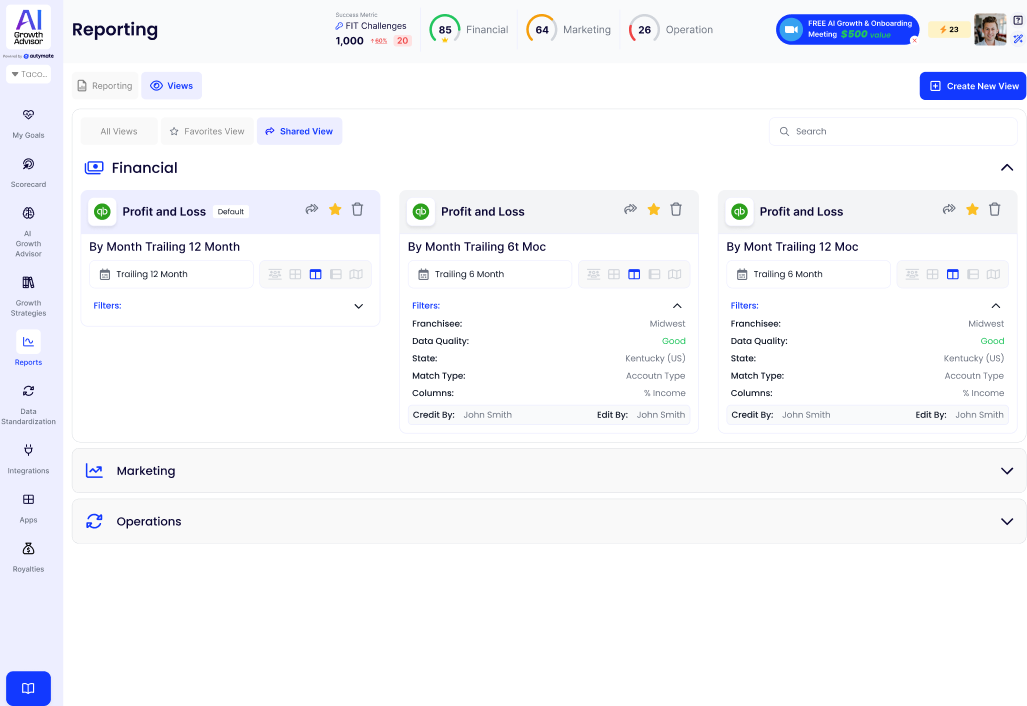
Steps to Generate Your Custom Financial Reports
1. Access Reports
To generate a financial report, navigate to the Reports section in your left-hand menu. This section provides all reporting tools in one place. Once logged in, click "Reports," and you will see a list of available reports organized under various categories.
2. Choose Report Type
Select the type of report you need:
- Profit & Loss Report – Displays revenue and expenses over time.
- Balance Sheet – Shows assets, liabilities, and equity.
- AP & AR Aging Summary – Helps track outstanding payables and receivables.
- Vendor Analytics – Provides insights into vendor spending and expenditure trends.
Choose the report that best fits your needs.
3. Apply Filters
To refine your report, use the available filter options:
- Date Range – Select a specific period (e.g., last month, last quarter).
- Franchise Location – View data for a single location or compare multiple locations.
- Account Type – Choose sales, expenses, or other relevant financial categories.
- Match Type – Select how accounts should be categorized.
- Data Quality Indicators – Use color-coded indicators to review financial accuracy.
- Column Selection – Customize the columns displayed in the report, such as the percentage of income.
4. Review and Customize
Once the report is generated, review the data closely. Expand or collapse report sections to view the details or a high-level overview. Click on specific data points to drill down into transaction-level information.
5. Export for Analysis
You can export reports for further analysis by clicking the Export option. Download the data in Excel format to create charts, graphs, or conduct a more in-depth review.
6. Schedule Reports
To automate report generation, schedule recurring reports:
- Choose daily, weekly, or monthly scheduling.
- AI Growth Advisor will generate the report automatically, ensuring up-to-date insights without manual effort.
With these steps, you can generate detailed financial reports in AI Growth Advisor, customize them to meet your specific needs, and utilize the insights for informed decision-making.
Comments
0 comments
Article is closed for comments.