How to Setup an Organization Follow

Introduction
Setting up your organization in AI Growth Advisor ensures your company’s details are accurately represented, unlocking data processing and strategy recommendations. Proper setup improves integration, reporting, and operational efficiency.
Log In and Access Organization Settings
- Log In: Open your web browser, go to the AI Growth Advisor login page, and enter your credentials.
- Profile Logo: On the main screen, click the profile logo in the top-right corner and select "Franchisor" from the dropdown menu.
Navigate to Add New
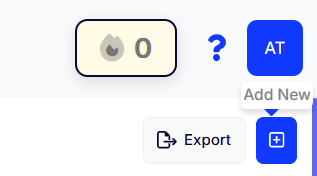
- + Icon: On the Franchisor settings page, click the + sign icon in the top right corner and select Add New.
Set Up Your New Organization
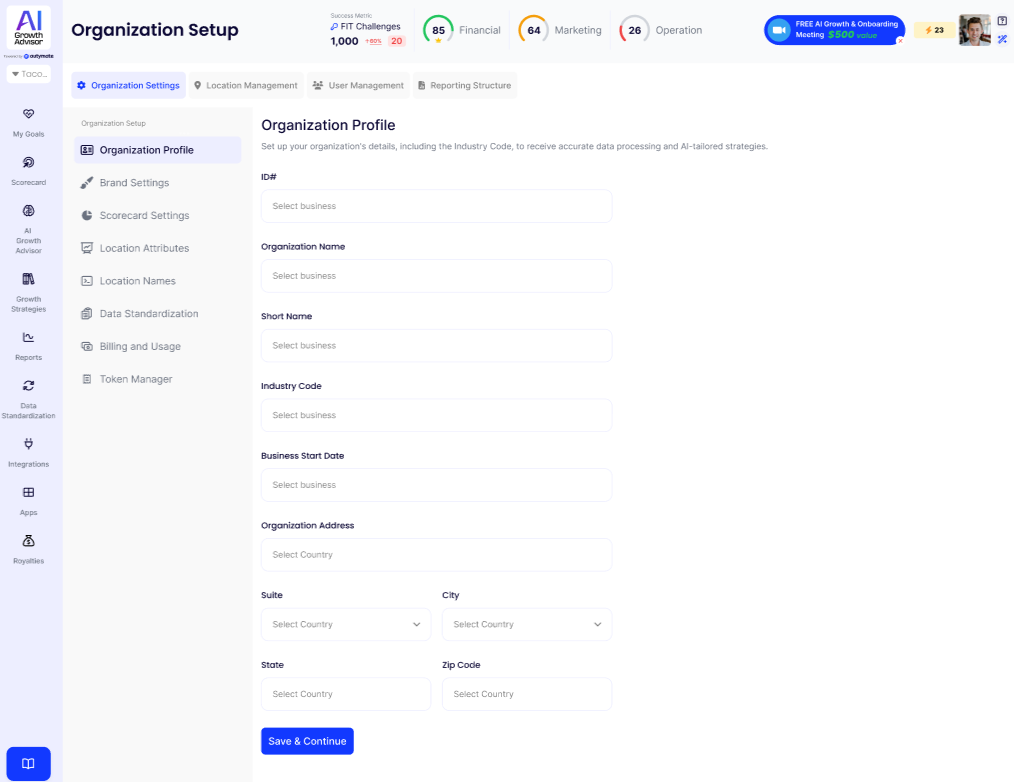
Step 1: Log In and Open Organization Setup
-
Log In:
Go to the AI Growth Advisor login page and enter your credentials. -
Navigate to Organization Setup:
From the left menu, click Organization Setup (gear icon).
Step 2: Enter Your Organization Profile
-
Select Organization Profile:
In the Organization Setup sidebar, click Organization Profile. -
Fill in Your Details:
Complete the fields provided:-
ID#: Enter your organization’s unique ID or select from the dropdown.
-
Organization Name: Type the full name of your organization.
-
Short Name: Enter a short or abbreviated name (if needed).
-
Industry Code: Select the code that best fits your business type for accurate reporting and AI recommendations.
-
Business Start Date: Pick your company’s establishment date.
-
Organization Address: Add your main business address, including Suite, City, State, and Zip Code.
-
Step 3: Save Your Information
-
Once all required fields are completed, click Save & Continue at the bottom of the page.
Step 4: Continue Organization Setup (Optional)
After saving your Organization Profile, you can proceed through the other setup sections using the sidebar:
-
Brand Settings: Upload your logo and set your brand preferences.
-
Scorecard Settings: Configure your team’s scorecards and KPIs.
-
Location Attributes: Set up attributes for different business locations.
-
Location Names: Customize naming conventions for your business entities.
-
Data Standardization: Set preferences for how your business data is structured.
-
Billing and Usage: Enter your preferred billing details.
-
Token Manager: Manage your organization’s API tokens.
Review your information for accuracy before saving. Accurate setup enables you to maximize the benefits of AI Growth Advisor's reporting, analytics, and AI-driven strategies.
Comments
0 comments
Article is closed for comments.