2 Minutes Onboarding Process in AI Growth Advisor Follow

Welcome to AI Growth Advisor
Get started in just two minutes and unlock your AI-powered growth journey. Follow these steps for a smooth onboarding experience.
Step 1: Sign Up for Your Account
Choose Your Sign Up Method
You can sign up with Intuit, Google, or Microsoft, or manually enter your details.
Enter Your Details
- Fill in your First Name, Last Name, Email, Phone, and create a password.
- Agree to the Terms and Conditions and Privacy Policy.
Complete Sign Up
- Click Sign Up to create your account.
- If you already have an account, select Log In instead.
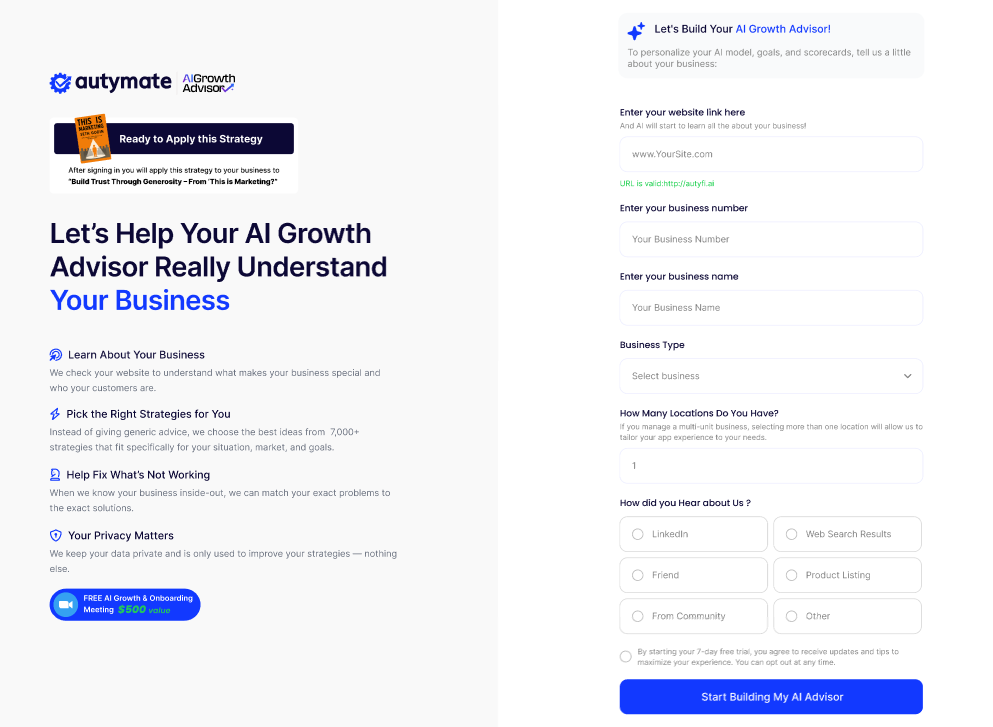
Step 2: Provide Your Business Information
Enter Business Details
- Enter your business website link if you have one.
- Type your business name.
Set Up Your Business Structure
- Enter the number of locations you have (for single or multi-location businesses).
- Select your business type from the dropdown list.
Tell Us How You Found AI Growth Advisor
- Choose how you discovered us (e.g., Website, Search, Video, App Store, Community, or Other).
Continue to Next Step
- Click Continue to move forward.
Step 3: Get Personalized AI Growth Strategies
Access Instant Features
- Immediately receive a tailored AI-powered strategy based on your business information.
- Access a complete library of book summaries and actionable strategies.
- Set your first goal and start tracking progress with real-time scorecards.
Claim Your Free Growth & Onboarding Meeting
- Schedule a complimentary session to maximize your success with AI Growth Advisor.
Why This Process Matters
Fast and Efficient
- Complete onboarding in just two minutes and start using AI Growth Advisor right away.
Personalized to Your Business
- Your answers help the AI deliver custom strategies, insights, and goals that fit your needs.
Immediate Value
- Get actionable steps and a recommended strategy as soon as you sign in.
Need Help?
If you have questions during onboarding, look for help links on the page or reach out to our support team at any time.
Comments
0 comments
Article is closed for comments.