What is Royalty Feature in AI Growth Advisor? Follow

![]()
![]()
Introduction
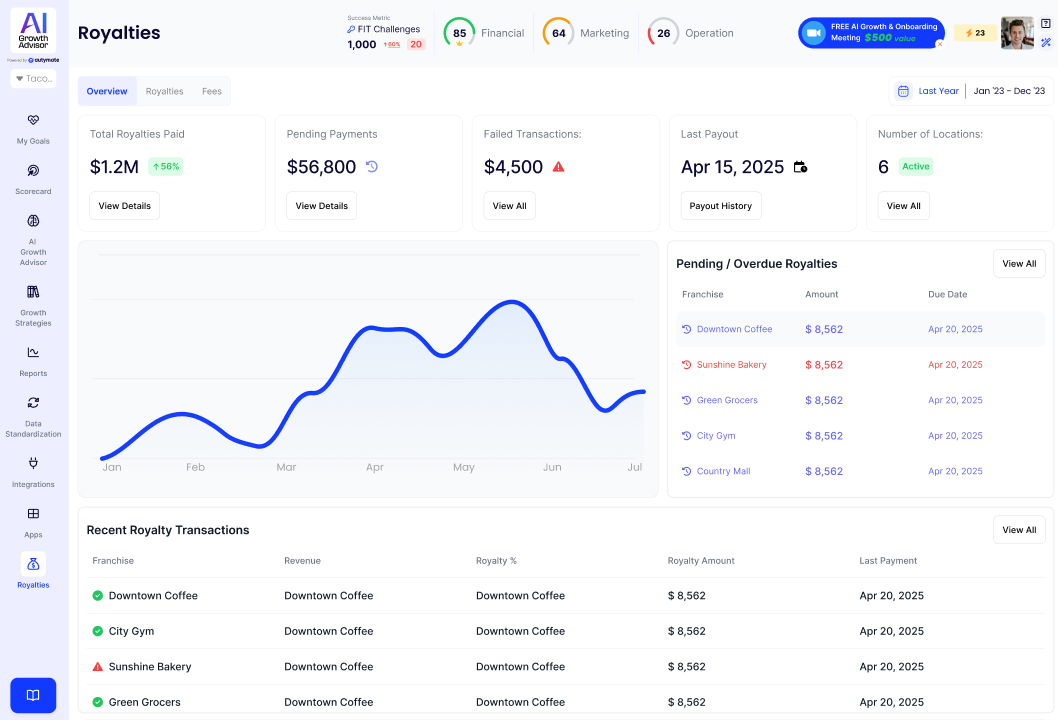
The Royalties feature in your app helps you easily monitor, manage, and track all royalty payments across your locations. Whether you want to view what has been paid, what is still pending, or stay on top of upcoming payments, this dashboard provides a clear, real-time overview, saving you time and keeping you organized.
How to Use the Royalties Feature
1. Access Royalties
- Click on the Royalties icon (book symbol) on the left sidebar to open the Royalties dashboard.
2. Understand Your Dashboard
- At the top, view important stats:
- Total Royalties Paid: The total amount you’ve paid so far.
- Pending Payments: What you still owe.
- Failed Transactions: Payments that didn’t go through (look for red alerts).
- Last Payout: The most recent payment date.
- Number of Locations: How many active locations are included?
3. Analyze Trends
- The graph shows your royalty payment trends over time, helping you spot increases or drops.
4. Stay Updated on Payments
- See the Pending / Overdue Royalties list on the right. Overdue payments are highlighted in red, enabling you to take prompt action.
5. Review Recent Activity
- Check recent royalty transactions at the bottom. See who paid, how much, and when.
6. Dive Deeper
- Click "View All" or "Payout History" for more details on payments and history.
Why Use This Feature?
- Quick Clarity: Instantly see your payment status.
- Better Organization: Keep tabs on all locations in one place.
- Never Miss a Payment: Get alerts for overdue amounts.
Use the Royalties feature regularly to ensure your payments are always on track!
Comments
0 comments
Article is closed for comments.